Skip to content
en
United States USD

4K 60Hz HDMI Audio Extractor with Optical and 3.5mm Outputs

Regular price $34.99
  • ✅ Please note: This HDMI audio extractor is not compatible with certain Apple Tv's and Comcast Xfinity boxes.
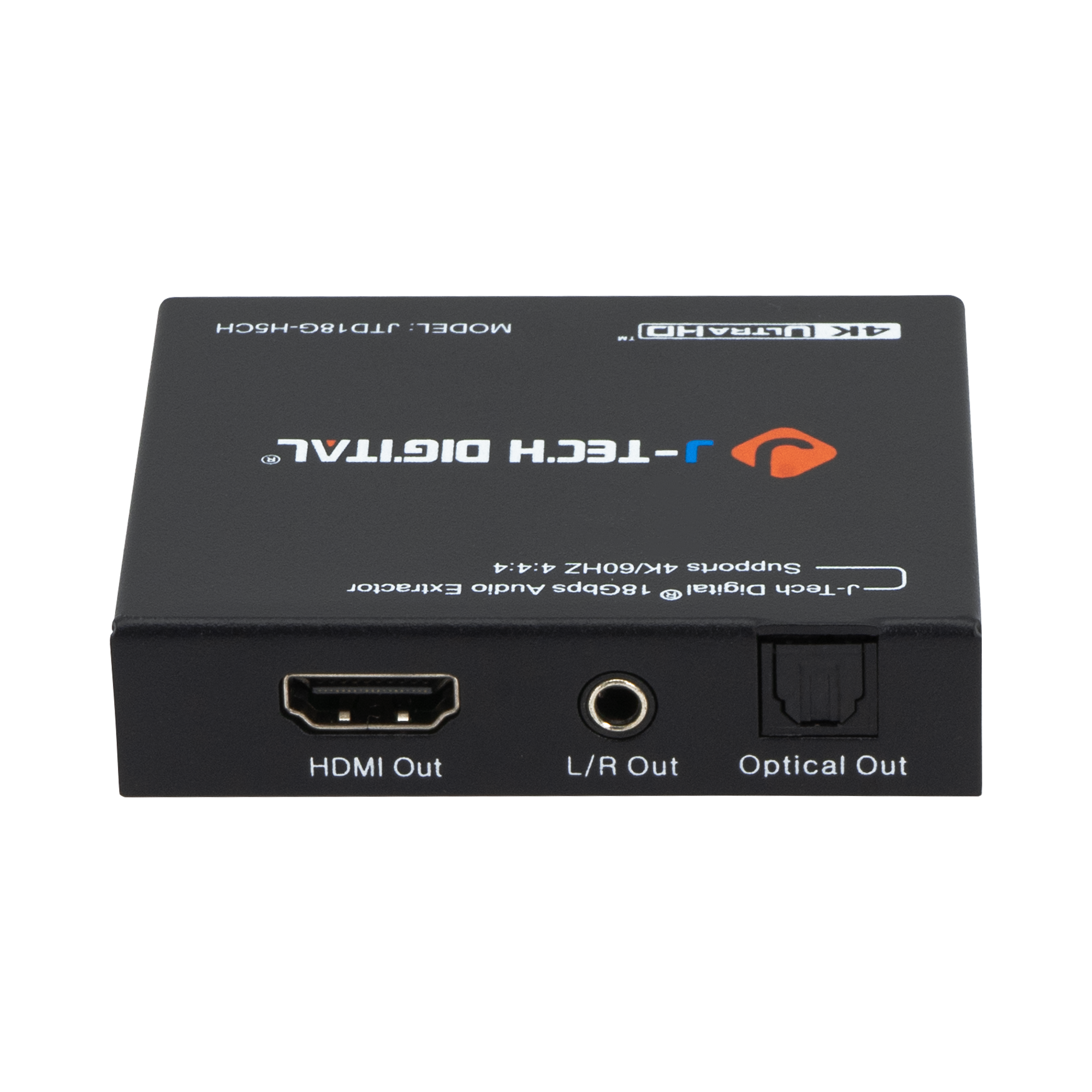
  • ✅ HDMI Audio Extractor: Extract audio from an incoming HDMI audio / video signal, and send it to an external sound system via SPDIF Optical and/or 3.5mm Analog.
  • ✅ UHD Resolution Support: Supports up to 4K@60Hz, 1080P@ 120/144Hz.
  • ✅ Dual Audio Outputs: 3.5mm audio output supports up to 2ch stereo audio. SPDIF Optical supports up to Dolby Digital 5.1.
  • ✅ EDID Toggle Switch: Three EDID settings (TV / 5ch / 2ch) to help maximize audio compatibility.
SKU:
JTD-322
Model:
JTD18G-H5CH

J-Tech Digital 4K HDMI audio extractor, black metal housing, JTD18G-H5CH
4K 60Hz HDMI Audio Extractor with Optical and 3.5mm Outputs

The HDMI 18Gbps Audio Extractor could extract audio signals from any HDMI compliant source to digital optical or analog stereo L/R audio outputs. Further, both input and output HDMI support video resolution up to 4K2K@50/60Hz (YUV444). It supports 10bits HDR (High Dynamic Range) pass through and HDMI high resolution digital audio formats bypass, LPCM 2CH, Dolby TrueHD, Dolby Atmos and DTS-HD Master Audio, audio sampling rate up to 192 kHz. HDCP 2.2 and CEC bypass are supported.

Please Note: If you are not able to get audio from either Optical or 3.5mm output ports, please check your input source audio settings and ensure that the audio output is set to either PCM (For 3.5mm output), or PCM, DTS, or Dolby Digital (For Optical output). If the input source device is outputting Dolby Digital+ (DD+) or higher audio format, the extractor will not pass audio through the audio output ports.

Extracts HDMI audio to multi-channel optical (SPDIF) or L/R analog audio while passing video to the display

Supports 3 different EDID settings to help achieve best audio format possible for the desired output

Optical audio supports LPCM 2CH, Dobly Digital 2/5.1CH, DTS 2/5.1CH

Video resolutions up to 4K@60Hz YUV 4:4:4:

10bits HDR (High Dynamic Range) pass through | Supports CEC bypass

Specifications

Video

Name Values
HDMI Compliance HDMI 2.0b
HDCP Compliance HDCP 2.2 and HDCP 1.4
Video Bandwidth 18 Gbps
Resolution Up to 4K 60Hz YUV 4:4:4
Color Space
  • RGB
  • YCbCr 4:4:4
  • YCbCr 4:2:2
Color Space
  • 10-bit
  • 12-bit
Inputs 1x HDMI Type A [19-pin female]
Outputs
  • 1 x HDMI Type A [19-pin female]
  • 1 x L/R Audio Out [3.5mm Stereo Mini-jack]
  • 1 x Optical Out [S/PDIF]

Audio

Name Values
HDMI Audio Formats (Pass-Through)
  • LPCM 2/5.1/7.1CH
  • Dolby Digital
  • DTS 5.1
  • Dolby Digital+
  • Dolby TrueHD
  • DTS-HD Master Audio
  • Dolby Atmos
  • DTS:X
Optical Audio Formats
  • LPCM 2CH
  • LPCM 5.1
  • Dolby Digital 2/5.1CH
  • DTS 2/5.1CH
L/R Audio Formats Analog Stereo 2CH

General

Name Values
Housing Metal Enclosure
Color Black
Dimensions 73.5mm [W] x 60.7mm [D] x 17mm [H]
Weight 130g
Power Supply
  • Input: AC100 - 240V 50/60Hz
  • Output: DC 5V/1A (US/EU standards, CE/FCC/UL certified)
Power Consumption 1W (Max)
Operation Temperature 32 - 104°F / 0 - 40°C
Storage temperature -4 - 140°F / -20 - 60°C
Relative Humidity 20 - 90% RH (no condensation)

Resources & Downloads

Category Description Version File
MANUAL User Manual 1.0 JTD-322-user-manual.pdf

Category: MANUAL

Description: User Manual

Version: 1.0

File: JTD-322-user-manual.pdf

This 4K 60Hz HDMI audio extractor effectively separates audio and video signals for various setups. Customers said it "works great" and is a "solid piece of gear." Most praised its build quality, compatibility with gaming consoles, and audio extraction capabilities. Some noted setup complexity and occasional compatibility issues with specific cables or projectors.

  • Works great with hearing aids! Allows sound to go directly into ears, eliminating need to crank up TV.
  • Used to extract HDMI audio from classic consoles to Bluetooth speaker system. Worked like a charm.
  • Retains lossless quality of originals. No discernible impact on audio or video. Simple to set up.
  • 5 stars: 13 (65%)
  • 4 stars: 3 (15%)
  • 3 stars: 4 (20%)
  • 2 stars: 0 (0%)
  • 1 star: 0 (0%)
C
C. Arroyo
Sound /Video quality work as supposed

Great for PS4 /Slim too. My Display Elite HP doesn't have speakers, PS4 don't support optical, Bluetooth at least you install USB transmitter Bluetooth. So I installed the extractor HDMI from PS4 source to HDMI In and out to the Display and a optical to a sound bar. Work out the box. Also select in the PS4 setting audio out you preferences, my DTS sound great with the sound bar. Fyi

K
Kent
Learning Experience - Update 2

Update 2:Okay, so this review chronicles my learning what this thing/EDID actually does 🤦‍♂️ There’s no “downmix” happening in this machine - It simply extracts the audio and either tells the source what it requires or doesn’t. Judging simply on this functionality, I’m increasing my rating to five stars. It’s solid, inexpensive, and does its job with no harm to the data that I can tell. I think their “literature” could be clearer (for beginners anyway), but hey.The tradeoff with this component is though I avoid resampling by my television, I now rely on my Roku Ultra for PCM. Here’s the thing…There’s something about how Roku handles 5.1 that (at least for me) it assigns music to the right channel. The clearest example I have of this is the title-sequence of “Welcome To Derry” (via Max). However, if I stream it on Plex (which is already mixed down to stereo), the title music is perfectly centered to “the stage.” So I’m now shopping for a streamer upgrade, but I digress.My point is, in my experience, using this extractor puts more responsibility on your source. I don’t think that applies to everyone, but keep it in mind ✌️Update 1:I’ve been experimenting, and came back to say…1) I don't hear a strong difference, but I recommend setting the Roku Ultra to stereo and the J-Tech [JT] to passthrough/TV (photo taken with Roku in passthrough and JT in 2CH).2) WiiM Pro currently can’t read DTS etc, so leaving both preceding components in passthrough got me no sound (but oddly displayed 24/192 on my DAC… weird)3) I’d like to clarify the JT doesn’t change the Roku menu by default - It depends what order you adjust the EDID.All in all, decent product, but not sure it isn’t overkill in my scenario. Good build, no harm to video or audio, easy to use, and kind customer service that patiently answered my questions. 7/24/24Original Review:Well, I’m glad I at least got the TV out of the audio path, but let’s rewind…I had made such strides with my system’s music handling, I wanted to bring the TV experience up to speed. That’s not to say the sound quality bad or that I was having connectivity issues, but I was aware (or at least under the impression) that the TV was resampling the audio output. I was also tired of 5.1 streams (which, up until fairly recently was standard) burying dialogue in my 2.1 system. For example, being able to hear a difference between surround and stereo settings on Netflix, I assumed the mix-down was likely happening in the TV and was as mediocre as its analog conversion. That said, I was unaware of (and would eventually learn) four important things:1) The Roku Ultra’s audio can be set to “Uncompressed Stereo” (I am still kicking myself for not checking the source first).2) Setting the Roku to Stereo changes your menu options *in the streaming services*, and the presence of the Extractor changes the Roku menu i.e I cannot be certain the mix-down sounds any better outside the TV’s path3) You are not going to find audio above 24/48 being streamed by major services like Netflix, Max, Hulu etc. If you want 24/192, you’re going to need BlueRay discs or RIP’s.4) I believe the Roku is doing its own resampling to match the common 24/48 stream - Higher bitrates on a Plex server will not come through.So, I’m not sure I did much 😅 It seems almost everything I suspected of the TV was happening in the Roku (or is beyond my control to begin with). That said, I can tell you the device feels solid, it was easy to set up, and has not diminished the audible experience. I’ve had success upgrading power supplies (and the one provided seems a little “dinky”) but I see no point in experimenting with that given the circumstances. The manual seemed to be for an older model, and was the bare minimum of info, but I was able to find a slightly better version online.To give the full picture, the path is Roku Ultra > HDMI to Extractor > optical to a WiiM Pro > optical to DAC (Denafrips) > Preamp. The next move will likely/eventually be switching the source to a NVIDIA Shield TV Pro and see if that opens up the experience at all. I admittedly have only used the 2.0 setting up to this point, and need to try different “orientations” with the Roku. I’ll come back if I learn anything more ✌️

T
Tom Tempel
Works great and it is a solid piece of gear

Works great and it is a solid piece of gear.

k
keith saulsbury
Works well

Works well

J
John Radocy
Fast service with great communication!

Worked out great! Exactly what I needed at a very reasonable price.

a
al rivera
Na

Really good

A
ART
Very good

Fast delivery. Working as described.

C
Cynthia M. Lavin
Missing Out on Sounds Because of Hearing Aids? Then Get This Device!

This device works great with my husband's Widex 2 hearing aids! He was able to link the blue tooth capability with an app on his Iphone which allows him to have the sound go directly into his ears eliminating the need to crank up the actual TV volume which would hurt my ears. He reports hearing little sounds which he missed out on prior to acquiring this device such as crickets, leaves crackling, and other features in movies.

R
Raymond Brickey
HDMI Extractor

Received promptly but I couldn't get it to work, had to order a different model for what I needed to do. My lack of knowledge on the techy side is very lacking so that was the main issue. Their support team were very helpful.

D
Daniel P. Bullington
Works great!

Used this to extract HDMI audio from NES/SNES classic and old DVD devices connected to large computer monitor to push out via optical to Bluetooth transmitter to be picked up by my Bluetooth enabled speaker system.Worked like a charm.

C
CFortC
My first 4K viewing experience

I recently upgraded my PC monitor from 1920x1200 to 4K. I use an Amazon FireTV cube to view programs on the monitor, with an HDMI audio splitter to separate a digital audio signal in order to hear the audio on the programs.I had been using an Amazon Basics splitter but it only worked up to 1920x1080, fine for the old monitor but not for the new one. I found this J-Tech Digital splitter with the right specs and good reviews.Swapping the old splitter out, installing this new one immediately allowed me to view a 4K program from the FireTV cube. The audio for the program I viewed seemed to be in mono (L channel = R channel always) -- I assume that was the program not the splitter. I will update review if I find out different.

M
MJL
This one works

First of all, it works. Yes, you'd expect that, but another product that sold for more than this one din't work properly. I bought it to play through an Apple TV into my house music system, comprised of a 3 zone Denon and distribution amplifiers plus of course the speakers wire connected throughout the house. Content resides on a Mac. I wanted to retain the lossless quality of the originals; Air Play, an easier solution, compresses output. There is no discernible impact on the audio or video in playin video content streamed through the Apple TV. Simple to set up.

S
Schlemazl Beerbaum
Optical out might not work if you are connecting a projector to HDMI out.

Returned. Possibly a good product, but when I tried to use it to separate optical out from HDMI video signal coming out of Amazon Fire Stick 4k - it refused to send the optical signal. Apparently my projector told it that it is incapable of processing optical input and the extractor simply turned it off. The thing is, I need to send optical to my audio system, so I do not want my projector controlling what the splitter is doing. I was unable to figure out how to force the splitter produce optical out, as the secod I would plugin HDMI cable from my projector, the optical port would go dark. :)

J
Jeff Rodman
Great product and a solid company

I have been converting my home from standard TV to 1080P high resolution. The video source is in the garage (Roku), where the satellite and network feeds come in. All TV's (five different locations in the house) get the same video in my situation.Because there are spare Cat5e cables and coax cables in the walls of the house, finding J-Tech's HDMI extender products was a godsend. I have used them for HDMI - over - Cat5e (Cat6 and Cat7 would work too but my house is older than that) and for HDMI - over - Coax. Both work flawlessly. One of my endpoints is a projector that blocked the HDMI's audio (projector's fault), so I tried the J-Tech audio splitter prior to the projector and again, that works flawlessly. Three J-Tech product types, one happy customer, extremely easy setup all around.Here's another thing though: I had a few technical questions. J-Tech's customer support was awesome - they answered all my questions completely, clearly, and in less than a day. Thank you Jewel!My one suggestion to J-Tech is to upgrade their product manual to address questions like mine (specifically: can you swap transmitters or receivers? yes. Can you drive multiple receivers from a single transmitter? no. How should I interpret the status LEDS on the receivers and transmitters? transmitter: red is good; receiver: green is good) And whatever else comes to their minds to make the user's life easier.I think some of J-Tech's devices can work with 4k video, although as an engineer I have always been dubious that 4k is much more than a marketing ploy compared to 1080p; the human eye is not that discerning except under closely and continuously monitored conditions.

t
thereal_TOEBEANS
Good for Xbox Series and soundbars, but kind of complicated

You need to plug this box into the wall for it to work, but if you do, it works effortlessly.My soundbar has a aux-in cable, and so does this box. As long as you get the surprisingly complicated switches and things all in the right spot, you'll never have to touch it again.You plug in the HDMI from your Xbox or Playstation, and then it splits the audio and video into a second HDMI cable on the front of the box, and a few other audio ports of your choosing, along with the barrel jack to power the box itself, too. Just don't touch the switches on the back, and you'll be fine.The construction of this thing is like a tank! Its good hard sheet metal with screenprinting on the outside. The ports aren't protected, but they're firmly installed, and the rubber feet are substantial. I sometimes rest my coffee mug on it, there's a satisfying clink. They totally could have went with high-end plastic instead of metal afaik, but this is welcome!The sound out of it is clear, and the video is full 4k from my Xbox to my TV, no artifacts or visual issues.My biggest issue is with it's complexity. It's got options for you to use, which is sometimes good, but I think they could have made it smaller and easier to use if they'd just cut some of the extra ports and things.

J
Jay N
Solid Product | Not Perfect | Satisfied

My Home Theater Setup is currently still running on a Pioneer VSX-820 1080p Receiver. I bought this product for my PS5, as I run all of my 4K video straight to my projector and audio through my Pioneer.The PlayStation 5 has one signal HDMI out. No optical. No additional HDMI for audio. It’s ridiculous. The PlayStation 2 had a seperate optical port for crying out loud.In advance, this all could be unique to my setup but perhaps it will help someone:Coming out of my PS5, having the extractor set to “5.1 output” did NOT allow for the PS5 to extract properly in 5.1. The channels were all over the place and inconsistent.However, setting the extractor to “TV” as opposed to “5.1” has allowed for the audio channels to be sent to the correct speakers.There is a slight sense of quality loss or an “extraction decay” as it kicks out the signal a bit hotter or crunchier than what you’re used to with optical connection. I’m not going to complain, just observing, because it’s still significantly cheaper than purchasing a new receiver, equal or better than the quality of mine, and allowing me to use a PS5 with 4K playback and 5.1 surround sound.At the end of the day, it works and can be a good solution for most people.

P
Panda
Mixed Performance - J-Tech Digital 4K HDMI Audio Extractor Review

I purchased the J-Tech Digital 4K HDMI Audio Extractor with the hope of enhancing my audio setup for my home entertainment system. While the product offers some notable features, my experience with its performance has been a mix of highs and lows.The extractor's ability to support 4K 60HZ HDMI 2.0, along with a bandwidth of 18Gbps and HDCP 2.2, intrigued me as it promised high-quality audio and video output. The Dolby Digital and DTS Passthrough capabilities were particularly appealing, as I looked forward to an improved audio experience.The installation process was relatively straightforward, and the device's compact size made it easy to integrate into my setup.When the extractor worked as intended, the audio and video quality were impressive, providing clear and vibrant visuals along with enhanced sound quality.However, my experience was marred by inconsistent performance. There were instances where the extractor failed to pass through the audio signal correctly, resulting in audio dropouts or disruptions. These interruptions were frustrating, particularly during crucial moments in movies or TV shows.The CEC and HDR10 support added value to the device, but I encountered occasional issues with CEC functionality not working as expected.Additionally, the build quality of the device could be improved. The plastic casing felt somewhat flimsy, and the overall construction left me questioning its durability.The extractor's user manual could also benefit from clearer instructions and troubleshooting guidance to help users address any potential issues.In conclusion, the J-Tech Digital 4K HDMI Audio Extractor offers the potential for enhanced audio and video experiences, but its inconsistent performance and occasional audio disruptions are notable drawbacks. While it does deliver satisfactory results at times, the unreliability and occasional compatibility issues prevent me from giving it a higher rating. Three stars reflect my mixed experience with this product, and I hope that future iterations can address these performance concerns to offer a more consistent and dependable user experience.

P
Pearson McManguy
Didn't work with USB-C to HDMI Cable

When it works, it works well. No perceptible added latency, no audio issues, outputs are clean.It worked great when using an HDMI to HDMIc cable input (which is probably what most people are using it for). Unfortunately, my setup (laptop - extractor - projector/soundbar) requires a USB-C to HDMI cable for optimal low-latency performance, which is a necessity for me. Using this extractor with the USB-C cable resulted in a very unstable signal, which was constantly resetting and dropping, and was unusable.If you need to use an atypical/adapter cable as an input, this may not be the most stable option. I tested all the cables independently (all were fine), and replaced this unit with a similar one from another brand (solved the problem).When it works it's great, so if you're going HDMI to HDMI, this is a good bet. Took one star off for compatibility issue.

B
Brandon C.
Great HDMI Audio Splitter for Xbox Series X

PROS:++ supports 1440p @120Hz video passthrough (to my knowledge there is no other HDMI splitter out there that will support this! Make sure you have a compatible HDMI cable. I was using 2CH mode.)++ 192 kbit/s audio quality is great for games and media consumption.+ Excellent stereo isolation in games. I can localize footsteps extremely well in Battlefield V much better than before.CONS:- no volume adjustment means games can be too loud or soft without an external amplifier/receiverREVIEW:I ordered this product in an effort to use my good open back headphones for audio out from the Xbox Series X being that they have effectively removed all other methods of extracting audio aside from HDMI. I already have a headset that connects to the Xbox, but I was looking for something that gives me much better audio quality and stereo isolation in games. This seems to be it!The thing that I love about this device is that allows for complete 1440p @120Hz video passthrough (albeit with the right cable) which is exactly what I was looking for since the audio extraction from my desktop monitor is absolute and utter trash in comparison to the sound that comes from this. HDR still works as well which is a plus. The sound quality is also more than good enough @192 kbit/s for immersion in whatever media you consume with no discernable clipping, latency or weird EQ'ing.The main thing that prevents me from giving this device a full 5 stars, and more like 4.5/5, is that there is no way to adjust the volume out to my knowledge. This makes some games and apps extremely loud when simply using low impedance headphones as the device's output. With extremely high impedance headphones, you'd probably have the opposite issue. While I understand you should probably route this to some kind of receiver or amplifier with volume adjustment, which I plan to do in the future, this is another thing you need to make sure you buy! However, this still works perfect for me as I can lower in game volume to a more tolerable level through in-game settings. If this had gain adjustment through some kind of built in amplifier, this product would be an absolute slam dunk (at least for my needs)!

M
Mank the old Squid
Did not work with HDMI

I purchased this to be a small Intel-based Small Board Computer. I was going to install LINUX on it, so I did not want the Windows License. My son was going to create on this a small website with a database. When I received it, I powered it with a 5 volt 2 amp power supply. It did not act the way the instructions said it would. That turns out to be a problem with my power supply. It was 5 volts, but it was not 2 amps. I then used a Rasberry Pi 2.5 amp and 5 volt power supply with the micro-usb connector already on it. I had a known-good HDMI cable connected to my HDMI monitor from this LattePanda, (LP), device. I plugged in the Rasberry Pi power supply and the Blue light came on. The Red LED came on for about 20 seconds, then the red LED went off, as it should. I then pressed the power button on the LP board and the red LED came on and never went off. I never saw any video on my HDMI monitor. If I did not have the HDMI connector connected to the LP board and I powered it up. When the Red LED went off after initially applying power, and I then pressed the power button, the red light came on and after awhile the red LED went off, as it should. BUT IT DID NOT WORK WITH AN HDMI MONITOR CONNECTED. How can I configure it without a monitor? I then sent an email to the seller with all of my notes via Amazon. I was told the seller would respond within 48 hours. It has been well over 48 hours and I have not received any response from the seller. My picture quality rating is very low because I never saw a picture. My tech support rating is 1 out of 5 because I have received no tech support. I understand that sometimes there are boards made in mass-production that do not work... I get that. I just want you to consider my experience. I have read all the reviews and they are good. That is why I purchased this in the first place. However, mine was faulty and the seller's tech support, so far, does not exist. If I do not hear back in the next 12 hours from the seller, I will be requesting a refund and send this back. I will then buy one more, but I am not sure what to expect. Nor am I certain that getting another one is a good idea. I just want to make sure this was not a one-off bad product out of many good ones. I do know the tech support is not responsive, in my experience. Be fair-warned.

Drawer Title
Join our Newsletter

Join our Newsletter

Similar Products